
Design Analysis

The Design Analysis feature allows you to view details about the size, colors, statistics, and production (stitch-out) of the design. This is helpful to see the stitch-out, the time required for production, the colors of thread and the amounts needed.
With a design on the work page, select Design Analysis on the Tools tab. Four tabs appear in the dialog box and are described below.
1. Details
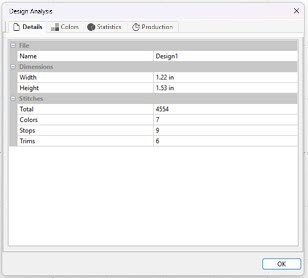
Information is displayed for the size, colors, stops, and trims in the design.
2. Colors
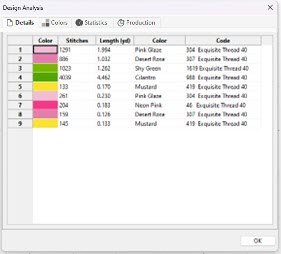
The stitch order of the individual colors is listed, along with the stitch count per color and the length of thread needed.
The list of thread colors includes color name, brand and code number.
3. Statistics
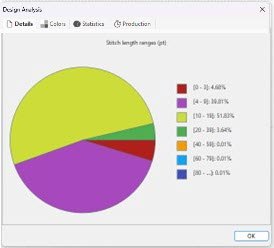
A pie chart illustrates the stitch length ranges and their percentage of the design.
4. Production
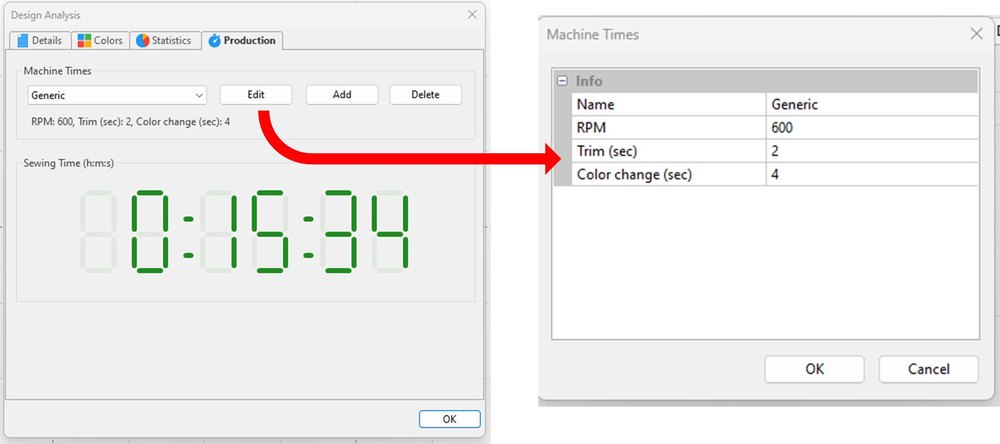
This tab displays the stitch-out time determined by the parameters set in the Machine Time feature.
Customize the Machine Times by selecting the Edit, Add or Delete buttons.
Selecting the Edit button opens the dialog box shown above on the right. Here you can name machines and change the time for thread color changes, trims, and the stitches per minute (RPM). Highlight the current value, type in the new value and click OK.